







Thanks for marking this review as helpful.
SocialBu
4.5/5
Product info
| Format | Supported platforms listed on the site: Facebook, X (Twitter), Instagram, Threads, LinkedIn, TikTok, YouTube, Reddit, |
| Category | HR |
| Last review | 20 June 2026 |
| Published | 20 June 2026 |
| Free trial | No |
| API access | No |
Overview
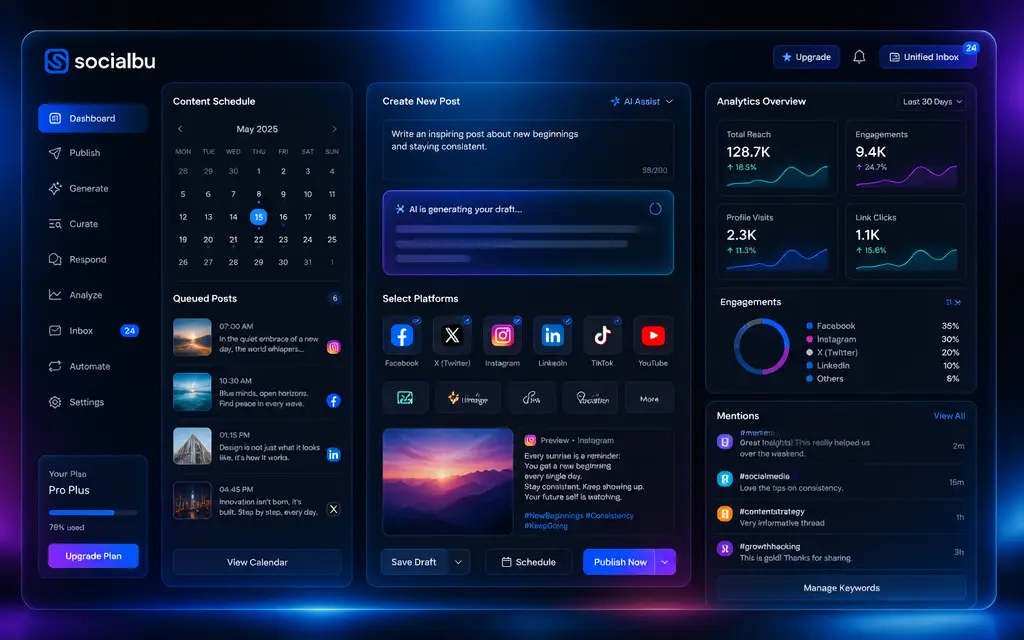
SocialBu presents a focused, practical take on multi-account social management by combining several distinct workflows into one dashboard. The site foregrounds AI-assisted post creation alongside robust scheduling tools, including preview, recycle, and bulk-schedule capabilities. Engagement features are grouped under a respond workflow that handles messages, comments, reviews, and mentions, while listening tools let users track keywords and conversations. The product’s curation features emphasize discovery with advanced filters, which supports niche content sharing and helps reduce the time typically spent searching for repostable material.
The platform’s breadth of supported networks is a clear strength: Facebook, X (Twitter), Instagram, Threads, LinkedIn, TikTok, YouTube, Reddit, Mastodon, Pinterest, Bluesky, and Google Business Profile are all listed. The website also highlights the option to connect AI assistants to SocialBu, reinforcing its positioning as a speed-focused tool for teams that need streamlined drafting and scheduling. Additional site resources such as free tools, a public roadmap, help articles, and how-to videos suggest a product aimed at hands-on practitioners who want guidance while scaling their posting and listening workflows.
Highlights
- Best suited to creators, businesses, and teams
- Positioned as an all-in-one social media dashboard
- Primary platform footprint includes Facebook, X, Instagram, LinkedIn, TikTok, YouTube
- Also supports Threads, Reddit, Mastodon, Pinterest, Bluesky, Google Business Profile
- Primary capabilities: AI-assisted post creation and multi-platform scheduling
- Scheduling features include preview, recycle, and bulk schedule
- Engagement hub for messages, comments, reviews, and mentions
- Listening tools to track keywords, mentions, and conversations
- Curate and discover niche content with advanced filters
- Allows connection of external AI assistants to the dashboard
- Resources include free tools, a blog, help articles, and a public roadmap
- Market message emphasizes speed and centralized control
FAQ
The website lists support for Facebook, X (Twitter), Instagram, Threads, LinkedIn, TikTok, YouTube, Reddit, Mastodon, Pinterest, Bluesky, and Google Business Profile.
Yes. The site highlights AI-assisted post creation with copy such as create posts with AI in seconds and mentions the ability to connect AI assistants to the dashboard.
Yes. The site specifically references bulk schedule and recycle alongside schedule and preview features.
Yes. The website lists a respond workflow that covers messages, comments, reviews, and mentions.
Yes. The site describes listening features that track keywords, mentions, and conversations.
Yes. The site notes discovery and curate features with advanced filters to find and share niche content.
The site includes a Pricing section and mentions Free Tools, but specific pricing or free-trial details are not provided in the supplied evidence.
Yes. The website lists a public roadmap along with a blog, help articles, and how-to videos.
Yes. The site explicitly references the ability to connect AI assistants to SocialBu.
API access is not indicated in the supplied site evidence.
Customer reviews
Sarah Miller, Social Media Manager
June 20, 2026
I moved several client accounts onto SocialBu because the scheduling and bulk-upload functions save us hours each week. The unified inbox and mention tracking also help our small team stay on top of brand conversations.
Yes, I recommend this service
Helpful?
James Carter, Freelance Content Creator
June 20, 2026
The AI post drafts are a great time-saver for caption ideas. I wish there were more native analytics detail on the site, but scheduling and cross-posting work very reliably.
Yes, I recommend this service
Helpful?
Olivia Bennett, Marketing Lead
June 20, 2026
SocialBu's support for multiple networks, including Threads and Mastodon, made it easier to coordinate campaigns from one dashboard. The public roadmap and help articles were useful during setup.
Yes, I recommend this service
Helpful?
Mark Reynolds, Small Business Owner
June 20, 2026
Scheduling and recycling old posts has kept our content calendar full without hiring extra help. The mention tracking gives good visibility, though I would like more examples for best-practice filters.
Yes, I recommend this service
Helpful?
Emily Ortiz, Community Manager
June 20, 2026
The respond workflow for messages, comments, and reviews is exactly what our team needed. It reduces context-switching and helps us respond faster to customers.
Yes, I recommend this service
Helpful?
Daniel Brooks, Digital Strategist
June 20, 2026
Content discovery with advanced filters surfaced niche stories we repurposed into posts. The ability to connect AI assistants speeds up first drafts, which is helpful during busy campaign weeks.
Yes, I recommend this service
Helpful?
You may like this
Service
Visit provider