










Thanks for marking this review as helpful.
SlidesAI
4.5/5
Product info
| Format | Available as an add-in for Google Slides and PowerPoint; supports Web and Desktop add-in stores; optimized for Google |
| Category | Design |
| Last review | 21 June 2026 |
| Published | 21 June 2026 |
| Free trial | No |
| API access | No |
Overview
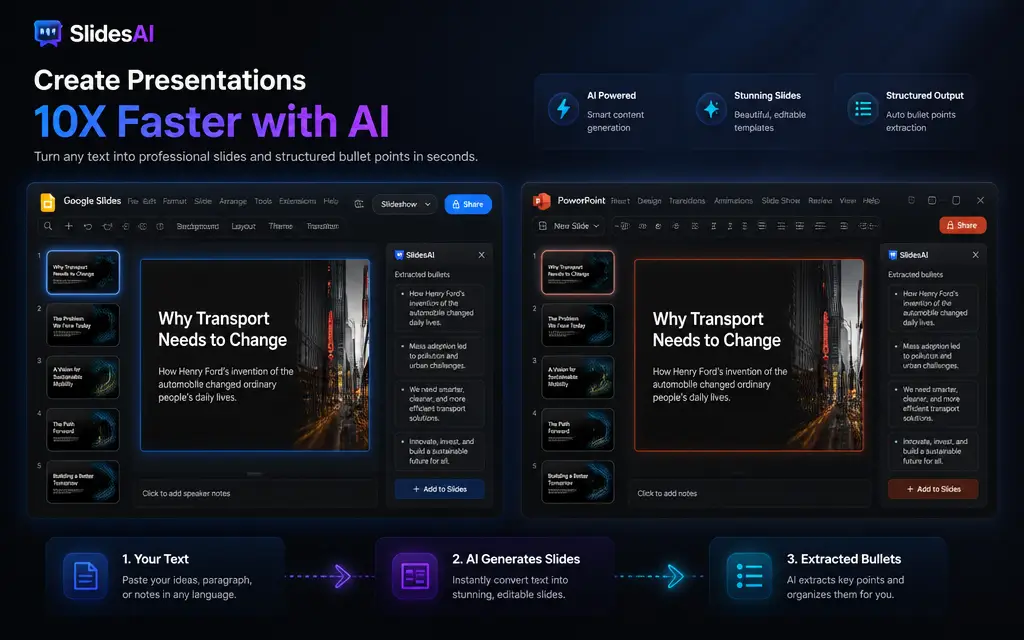
SlidesAI sells itself on speed and integration. The product works inside Google Slides and PowerPoint as an add-in, allowing users to turn paragraphs into slide content in seconds and to generate subtitles automatically for each page. The site emphasizes accessibility with a free getting-started option and states the tool is optimized for both Google Workspace and Microsoft Office users. There is also a credibility signal in the form of a 14M+ downloads figure and references to usage by leading companies and universities. On the user side the available feedback highlights practical benefits such as automatic extraction of bullet points from longer paragraphs, fast support responses, and a clear time saving for routine slide creation tasks.
The workflow advantage is simplicity - draft text, run the AI generator, then polish inside the native presentation editor. Because the output lands directly in Google Slides or PowerPoint, no export-import steps are required, and the result remains editable in familiar apps. That makes SlidesAI attractive for teachers, students, and professionals who need to produce clean decks quickly without design skills. The site materials and testimonials avoid technical complexity and focus on immediate productivity gains rather than advanced customization or enterprise features. Pricing details beyond a free start are not provided in the supplied evidence, and there is no mention of an external API or developer program on the public pages reviewed here.
Highlights
- Primary platform footprint: Google Slides and PowerPoint add-ins
- Positioned as a free-to-start AI presentation generator
- Best suited to teachers, students, and professionals
- Primary capability: turn text into slides in seconds
- Feature highlight: automatic paragraph-to-bullet conversion
- Feature highlight: automatic subtitle generation per slide
- Installable from Add-ins store for Web and Desktop
- Optimized for Google Workspace and Microsoft Office users
- Credibility signal: 14M+ downloads listed
- User-reported benefits include fast support and time savings
- Market positioning: productivity layer on top of mainstream editors
- No design skills required according to product messaging
FAQ
SlidesAI works with Google Slides and PowerPoint and is available as an add-in for Web and Desktop.
Yes. The site highlights automatic analysis of paragraphs into bullet points.
According to user feedback shown on the site, SlidesAI can automatically generate subtitles on each slide.
The site invites users to get started for free. Additional pricing tiers are not specified in the provided evidence.
SlidesAI is available in the Add-ins store for both Web and Desktop versions of supported presentation apps.
The product is presented as suitable for teachers, students, and professionals who need to create presentations quickly.
Yes. The site explicitly states the tool is optimized for Google Workspace users as well as Microsoft Office users.
The site references a 14M+ downloads figure and mentions usage by leading companies and universities.
No. The product messaging states that no design skills are required to produce slides.
Yes. Since SlidesAI creates content directly inside Google Slides or PowerPoint, the output remains editable in those applications.
Customer reviews
Mark Reynolds
June 21, 2026
As a high school teacher I use SlidesAI to turn lesson notes into slides in minutes. The subtitle generation and bullet extraction save me a lot of prep time.
Yes, I recommend this service
Helpful?
Aisha Khan
June 21, 2026
Great for quick presentations in Google Slides. Works as an add-in and produced usable slides I could edit afterward. Support replied quickly when I had a question.
Yes, I recommend this service
Helpful?
David Chen
June 21, 2026
I appreciate that it integrates directly with PowerPoint. The AI turned my long paragraphs into neat bullet points and added helpful subtitles automatically.
Yes, I recommend this service
Helpful?
Emily Foster
June 21, 2026
Excellent time saver for student projects. The generated slides were easy to tweak in Google Slides. Would like to see more detailed pricing info on the site.
Yes, I recommend this service
Helpful?
Ryan Patel
June 21, 2026
Solid add-in for rapid deck creation. No design skills required as advertised and integration into my existing workflow was seamless.
Yes, I recommend this service
Helpful?
Samantha Lopez
June 21, 2026
Used it to prepare an internal update. The AI extracted key points well and left the slides editable in PowerPoint. Fast and reliable.
Yes, I recommend this service
Helpful?
You may like this
6 reviews
6 reviews

6 reviews

6 reviews
6 reviews
6 reviews
6 reviews

6 reviews
Service
Get started for free. No further pricing details provided in the supplied evidence.