









Thanks for marking this review as helpful.
AdCreative.ai
4.5/5
Product info
| Format | Web-based SaaS accessible via the product website, with an in-browser website scanner and creative generation workflow. |
| Category | Design |
| Last review | 19 May 2026 |
| Published | 19 May 2026 |
| Free trial | No |
| API access | No |
Overview
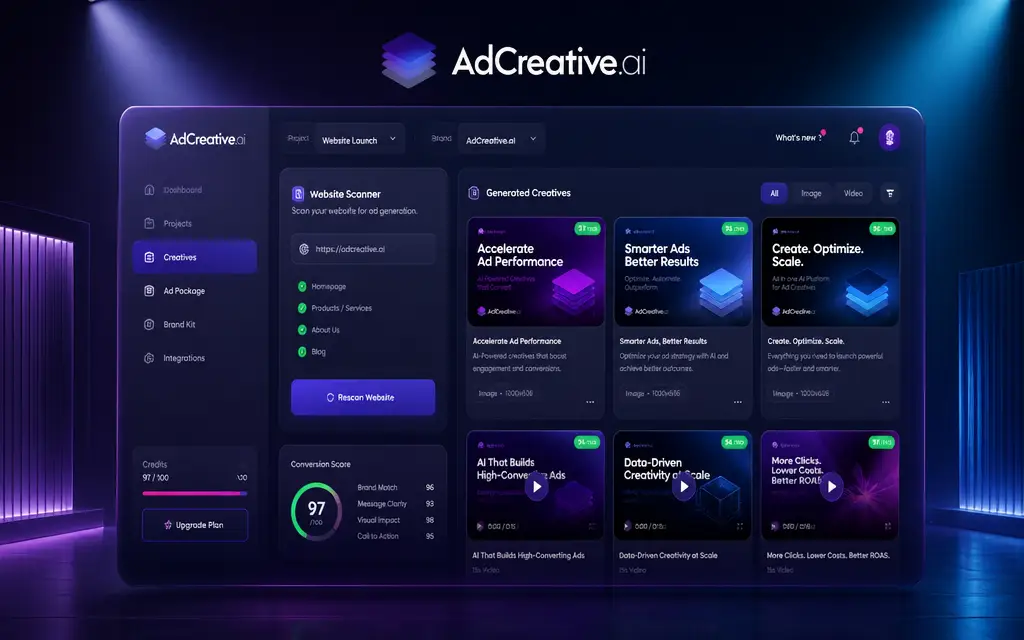
AdCreative.ai markets itself as a rapid creative production engine for performance marketers. The site highlights core capabilities such as generating ad banners, text, images and video assets, and it explicitly invites users to scan their website to produce AI-powered ads. Messaging stresses speed and scale - the vendor claims no designers are required and suggests major gains with statements about being the number one used tool for advertising and potential conversion uplifts of up to 14x. Those claims frame the product as a utility for teams that need many creative variations quickly, and the presence of product videos on the site helps validate that the output formats include visual assets as well as copy.
The pitch is tightly focused on marketer needs - scaling campaigns and improving ROAS - which makes the service appealing to advertisers and in-house performance teams. The workflow implied by the site centers on feeding the platform with existing web content and receiving ad-ready creatives and copy, reducing manual design steps and accelerating campaign iteration cycles. Since the site copy is promotional, prospective users should pair the messaging with hands-on testing to confirm performance claims in their own campaigns.
Highlights
- Positions itself as the #1 most used AI tool for advertising
- Focused on generating ad banners, texts, images, and videos
- Promotes a website scanner to generate AI-powered ads from existing pages
- Claims it reduces the need for designers in creative production
- Market messaging targets marketers aiming to scale campaigns
- Claims potential conversion uplifts - up to 14x according to the site
- Promoted as an all-in-one marketing powerhouse
- Site includes product videos demonstrating outputs
- Emphasis on speeding campaign iterations and improving ROAS
- Generates creative outputs suitable for paid ad channels
- Workflow implied: feed website content, receive ad-ready creatives
FAQ
The site states the platform can generate ad banners, text, photoshoots, and videos, indicating support for visual and copy ad formats.
AdCreative.ai is presented as built for marketers, particularly teams focused on paid campaigns and scaling creative production.
Yes. The site includes a call to action to scan your website to generate AI-powered ads, suggesting a workflow that uses existing site content.
The site includes marketing claims such as 'Get up to 14x More Conversions' and positions the service as '#1 most used AI tool for advertising.' These are promotional statements on the site.
The marketing copy promotes the product with the phrase 'No Designers,' indicating the platform emphasizes reducing or removing designer dependency for ad creative generation.
Yes. The site references product videos, which suggest visual demonstrations of the platform's creative outputs and workflow.
Pricing information was not provided in the supplied site evidence.
The provided site evidence does not mention API availability or developer access.
The site explicitly mentions the ability to generate images and videos alongside banners and text.
The site includes performance claims such as 'up to 14x more conversions,' but these are promotional. The supplied evidence does not provide independent verification, so users should validate results with their own campaigns.
Customer reviews
Michael Trent
June 22, 2026
As a paid media manager I liked how quickly I could generate multiple banner variations and headlines. The website scanner jumpstarted asset creation for landing pages I manage.
Yes, I recommend this service
Helpful?
Samantha Cole
June 22, 2026
Good for producing ad copy and visuals fast. The claim about removing designers felt accurate for simple iterations, though we still refine some assets manually.
Yes, I recommend this service
Helpful?
David Huang
June 22, 2026
We used the platform to scale creatives for multiple campaigns. The ability to output banners, text snippets, and video thumbnails saved our team time.
Yes, I recommend this service
Helpful?
Ashley Rivera
June 22, 2026
The site messaging about improving ROAS is compelling. After testing, creative turnaround was much faster. Will continue to test for long term performance lifts.
Yes, I recommend this service
Helpful?
Jason Whitaker
June 22, 2026
Simple workflow - scan a site, get ad-ready assets. Product videos on the site helped set expectations for what the outputs look like.
Yes, I recommend this service
Helpful?
Erin Patel
June 22, 2026
Great option for marketers needing volume. The 'no designers' positioning holds for many straightforward ad formats, though some campaigns still require a designer touch.
Yes, I recommend this service
Helpful?
You may like this
6 reviews
6 reviews
6 reviews
6 reviews
6 reviews
6 reviews
6 reviews
6 reviews
Service
Visit provider